Friday, December 10, 2021

How to know if your phone has virus and how to remove it??

 How to know if your phone has virus and how to remove it??


These 8 signs are an indication that your phone may have a virus:

  1. Excessive data usage: A compromised phone may have a virus that’s running in the background, undetected, which may significantly increase overall data usage.
  2. Apps crashing: If the software on your phone is compromised, it can cause apps to repeatedly crash. There can be a number of reasons apps will crash, so double check your storage isn’t full and you don’t have too many apps running at once before assuming the worst.
  3. Pop-ups: While some pop-ups are a normal function of advertising while browsing the web, if your browser is closed and you’re experiencing increased pop-ups you may be experiencing adware, a type of malware that’s goal is data-mining.
  4. Increased battery drain: If a virus, like malware, is running in the background during normal cell use, you may experience an inexplicably quick drain on your battery with the increased use of your phone’s RAM.
  5. Unrecognizable apps: When you see apps that were mysteriously downloaded, they may be a malicious form of malware. Trojan horses can also attach themselves to legitimate applications and cause further damage.
  6. Overheating: Malware can consume RAM and CPU quickly, which can cause your phone to overheat. While it can be normal for your phone to occasionally overheat, this chronic issue could also be a signal that there’s something more dangerous afoot.
  7. Spam texts: A common form of malware that can be found on a cell phone will gather sensitive data and attempt to also infect your contacts by sending texts with dangerous links and attachments.

Android devices are particularly vulnerable to malware attacks. Antivirus software is the most fail safe way to protect your Android from viruses. To remove a virus from an Android, first reboot the device in safe mode.

Step 1: Clear the cacheSelect apps and notifications, next find chrome. Go to its storage and select clear cache.

Step 2: Boot the device in safe mode. Press and hold the power button.

Step 3: Find the suspicious app. Open settings. Select apps. Manually review applications installed to find any suspicious downloads. Once identified, open the app information and uninstall.When the dialogue box appears, choose reboot to safe mode.

             Step 4: Enable play protect. While antivirus is the most secure way to protect your Android against malware, Play Protect is a built in software that can be useful as a secondary protection measure. To enable, choose the play store app. Open the menu in the upper left corner. Turn on the option to scan your device for security threats.

Tuesday, December 7, 2021

WHY DO MOST PEOPLE YOU LINUX FOR H#CKING?

1. Linux is open Source and any one can use 3/5 for any type of work, not only for h*cking.


2. Most of the linux Distros are free of cost. One of the most common linux distro is UBUNTU, followed by mint, debian and others.


3. You can edit, copy, distribute various aspects of a linux based OS without violating any copyright law or term and condition. This the reason I think, H*ckers use linux, because they can easily develop softwares used for hacking and pen-testing.


4. Linux OS like kali linux, parrot, backtrack are especially made for pentesting and checking security loopholes, often used for h*cking also.


5. They are made and maintained by developer forums, and are always available to fix bugs, you just need to put your problem in the forum and your problem will be discussed by thousands of developers.


6. They are secure and virus free, no antivirus needed.


7.Easy to use. There is a widespread myth, that linux is only for programmers and h*ckers, which i believe to be wrong, I have been using it for years and I am not a veteran programmer or h*cker and I found it more convenient and user-friendly than windows.

Saturday, December 4, 2021

YoU CaN AlSo!!

                  YoU CaN AlSo!!


               Android is a mobile multitasking operating system used in smartphones, tablets, readers, consoles, TVs, and even domestic robots. The OS was developed by Android Inc. basing on Linux and was later purchased and popularised by Google. The appearance of Android OS in 2008 made a splash, and it immediately became a leader in the market of smart devices. Thanks to this operating system, modern smartphones and tablets can be considered pocket mini-computers.

Android is a very flexible and friendly system with less than one hour enough for an initial acquaintance. Any user can easily configure OS settings as there is a large number of available relevant applications. You can change anything beyond recognition: if you don’t like the appearance, icons, or a ringtone, just go to Google Play Store, download a relevant application, and quickly configure everything to your liking.

Android mobile app development process

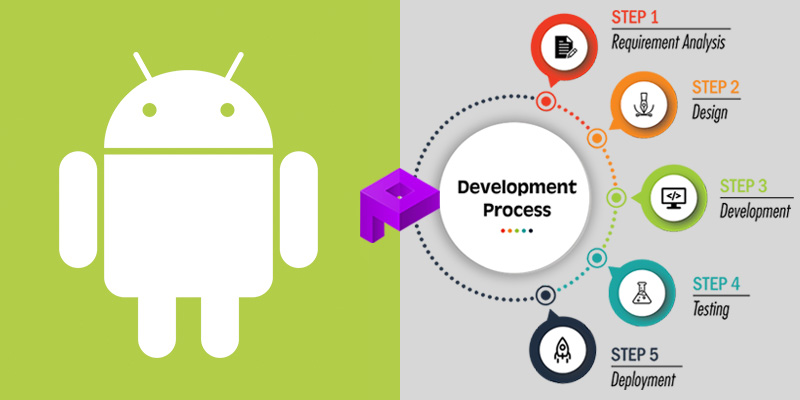
Developing an Android application isn’t just about creating it and adding it to Google Play Store. The process requires careful planning, research, and a clear focus. For your application to be successful, you must follow a number of steps correctly during its development. Typically, the entire cycle consists of five stages:

  1. Planning. Before starting development, it is important to define the target audience, purposes, and required functions of your Android application. It is also necessary to conduct comprehensive market research to ensure your application is competitive. At this stage, the ToR for the development of a mobile app are being prepared.
  2. Design. At this stage, the appearance (a mockup and user interface) is created. After approval, a designer starts working with the mockup. The designer prepares the final look that users will see on their Android devices.
  3. Development. Programmers create an Android application based on the design approved at the design stage.
  4. Testing. Once development is complete, the application must be tested. QA engineers must check it thoroughly to make sure the application functions in a correct way without any errors.
  5. Launch and maintenance. When testers have checked the application, you can safely release it to the market, namely, upload it to Google Play. However, after successfully adding to the store, your work has not come to an end. Like any software, the application has to be maintained. You must technically support it, improve its functionality, and add new features.

Android app development process

What the Android app development phase includes

Development is translating the vision of your project into life. At this stage, the Android development team will work on three main parts of the project at once: the back end, API, and front end.

      Come on guys its your time to become a developer......There are many online courses too for learning this. Do utilise and make yourself shine bright...💫

Thursday, December 2, 2021

WAYS TO HACK PROOF YOUR PHONE


Ways to hack proof your phone:


Be careful of what you install:

When you install a smartphone app, you may be asked to grant it various permissions, including the ability to read your files, access your camera or listen in to your microphone. There are legitimate uses for these capabilities, but they’re potentially open to abuse: think before you approve the request.

 Review what’s already on your phone:

Even if the apps on your phone seemed simple and safe when you installed them, subsequent updates could have turned them into something more sinister. Take two minutes to review all the apps on your smartphone, and see which permissions they’re using: on iOS, you’ll find lots of relevant information under Settings > Privacy.

  Be prepared to track and lock your phone:

Plan ahead, so even if your phone is stolen, you know your data is safe. One option is to set your phone to automatically erase itself after a certain number of incorrect attempts to enter the passcode.

Don’t leave online services unlocked:

Auto-login is a very convenient feature, especially since a virtual keyboard can make typing passwords a chore. It’s also a huge liability: an intruder simply needs to open your browser to gain access to all your online accounts.

Ideally, therefore, you shouldn’t use auto-login features at all. If you must, use a password manager app that requires you to regularly re-enter a master password.

Beware with open wifi:

We all know there’s a risk involved in using an open wireless network.

 But you may not realise how severe it is: anyone in the vicinity can snoop on what you’re doing online. This sort of attack demands specialist software and skills, so it’s unlikely to be a hazard in your local cafe, but it’s not a danger that can be ignored.

Lock individual apps:

On Android, as a second line of defence, you can lock individual apps, so even if someone can get past your lockscreen, they can’t open your email or banking app without a second password. This capability isn’t built into the OS, but there are plenty of free apps that provide it, such as AVG AntiVirus Free.

Monday, November 29, 2021

WHAT TO DO IF YOUR PHONE IS LOST/STOLEN

 1. 

DON'T MISS GOLDEN TIME

Try calling it first and hopefully you'll hear it ringing or vibrating. The next best case is that someone picks it up and engages in conversation. For example, if you left it at a café and a good Samaritan retrieved it, you can arrange to get it back from them.


2.

LOCATE

If your smartphones internet was turned on then you can locate your lost smartphone easily simply try to borrow anyones smartphone/laptop and do these:


Try to locate your phone using Apple Find My iPhone, Google Find My Device, or Samsung Find My Mobile using App/WebsitendTECHroid


iOS: icloud.com/find Android: google.com/android/find Samsung : findmymobile.samsung.com


3.

FILE A POLICE REPORT

If you believe your phone has been stolen, file a police report. Although law enforcement agencies don't have the resources to investigate every case of a stolen phone, if you're able to tell them where your phone is (using a finder app), they will be more likely to be able to help you recover it. Bear in mind, it probably won't be considered a high priority case, so could take some time.


Even if you don't end up getting your phone back, filing a police report can help in other ways. For example, in some countries, devices that have been reported missing or stolen are added to a nationwide blacklist. This means they won't work with any networks in the country.


4.

LOCK (AND MAYBE ERASE) YOUR PHONE REMOTELY

As soon as you find out your phone is with someone else, the priority should be making sure that the person cannot access the contents of the phone. To do this, you can lock your phone remotely. The exact process will depend on your operating system:


@andTECHroid


iOS: icloud.com/find


Android:google.com/android/find Samsung : findmymobile.samsung.com


5.

CALL YOUR SIM PROVIDER

Call your provider right away to suspend your service. Additionally, if you're unable to perform a remote lock or erase yourself, don't lose hope just yet, as your wireless provider might be able to help. Give them a call, and they may be able to deactivate the device and possibly wipe your personal information from it. (It may depend on carrier to carrier)


Contact insurance company if you have opted any


theft insurance while buying your smartphone


no one's if I hope no ones phone get lost but if it happens now you know what to do...

Saturday, November 27, 2021

ALTERNATIVE TO WATSAPP

  At a time when people are looking to move away from WhatsApp to a more secure messaging app, Chennai-based Software as a Service (SaaS) company Zoho has launched a made-in-India 'secure' messaging app called 'Arattai.At Arattai, they don't share your data with any third-party service providers. Your data is safe, as we have a strong focus on user privacy. Arattai is a cloud-based messenger and supports seamless syncing. You can access your messages from several devices at once, unlike with an app like WhatsApp.

The beta version of Arattai, which means to chit-chat in Tamil, was launched last week after Zoho employees began looking for alternatives to the world's largest messaging service.Arattai, which means chat in Tamil, is currently under a ‘friends-and-family trial’ release and will be launched formally in a few weeks, Sridhar Vembu, CEO of Zoho tweeted on Sunday. However, the app, which was under beta testing with employees over the past few weeks, is available for public download on both the Google Play Store and Apple’s App Store. Google Play Store shows that the app has already seen over 10,000 downloads. 

Similar to WhatsApp, Arattai says it might ask you to provide personal information such as profile name, phone number with country code, address, usage data and other optional info such as profile picture and contacts in your address book. Usage data could include information such as the type of mobile device you use, your mobile device unique ID, the IP address of your mobile device, your mobile operating system, the type of mobile Internet browser you use and other diagnostic data,” Arattai’s privacy policy states.


Messages


Arattai’s messages are currently not end-to-end encrypted. Sridhar said that this feature is being worked on and will be introduced during the app’s formal launch.

End-to-end encryption means that neither the app and service provider nor third parties can access or read your messages. WhatsApp messages, for example, are end-to-end encrypted.


FEATURES :

        As per reports, Arattai is similar to any messaging app with similar features. It can accommodate about 1,000 users in a group chat and six people in video calls, as per a TOI report. Sridhar said in his tweet on Sunday that there is a lot more in store. The TOI report also states that Zoho is working on more features such as secret chats, payment linkages, managing expenses, among others.


Tuesday, November 23, 2021

4 HIDDEN APPS

 PIN GENIE LOCKER


The most secure lock screen and Applock on Google Play. What makes this Locker unique is it's Patent PIN pad which is ultimate in privacy and will keep anyone from seeing your PIN, even if they watch you input it!


The magic PIN pad lock your screen with only 4 sleek buttons. Each button includes 3 numbers and all numbers reshuffle after each attempt. Go ahead use this Screen Lock & Applock to challenge your friends to see if they can crack your code!


TALKING RINGTONE MAKER PRO


Talking Ringtone Maker is a free app that lets you create new and personalized ringtones that really talk.


Just type in any phrase to hear it spoken in a variety of voices. Know if it's an important call or notification, without ever looking at your mobile phone.


NIGHT SCREEN


The main goal of this app is to reduce the brightness of your screen lower than you can achieve with the default settings.


This application applies an overlay filter that acts as a dimmer to darken the screen. It helps to avoid headache and eye pain in a dark environment or at night.


TRACK IT EVEN IF IT'S OFF


As the name suggests this app have the ability to track the location of your phone even without the Internet connection or even if the phone is switched off. It's the Best Antitheft App to Track & Find Lost-Stolen Mobile Phone.


Saturday, November 20, 2021

Top 4 whatsapp alternatives

 Top 4 WhatsApp Alternatives :

1. Signal:

Signal is free, has strong encryption, and works on all mobile platforms. Like most other messaging apps, Signal is really simple to use. It also offers voice and video calling, so you won’t miss WhatsApp.

Signal includes desktop installation files so you can use the app on your computer as well as your cell phone.

Every message is encrypted, so only the sender and receiver can read them. Messages are completely unreadable to hackers. 


2. Threema:

Threema promises complete privacy. Your contact lists and group information are stored solely on your phone, not in the app. Messages are deleted as soon as they’ve been delivered. Additionally, you can connect to people using an 8-digit Threema ID instead of a phone number, further protecting your privacy. You can verify contacts with unique QR codes.

Threema provides end-to-end encryption for all message types, including texts, voice calls, shared files, and group chats. It even encrypts your status messages so no-one can keep track of what you post. Messages can be read only by the sender and the intended recipient.

You can securely use Threema in-browser. 


3.telegram:


With more than 200 million active users, Telegram is a popular alternative to WhatsApp. The cloud-based app works across multiple platforms. Similar to WhatsApp, it uses a double-tick system to see when someone received a message.

The app features default end-to-end encryption for voice calls, ensuring that no-one can ever listen in on your calls. However, only its “Secret” chats are e2e-encrypted by default.

Normal one-to-one messages, group chats, and channels only use cloud-based encryption. That means your messages are stored on Telegram’s servers (and potentially accessible to the company or anyone able to hack the server).


4.Wire:

Protected by European data retention laws, Wire is a secure messaging app with end-to-end encryption. It offers free personal accounts and paid business plans with additional support and features. Wire boasts clear voice and video communications.

Wire offers 1:1 and group screen sharing. It also supports multimedia file sharing and audio filtering. Available for all major platforms, you can log in your account from eight synced devices.

You can format text with bold and italics, and create lists within chats. You’ll also be able to optimize file sizes for easy sharing, and set timers to delete messages for added privacy.

Monday, November 8, 2021

WHAT TO DO WHEN YOU FALL FOR A PHISING ATTACK?

 NOTIFY IT SUPPORT


FIRST, DISCONNECT YOUR COMPUTER FROM THE INTERNET AND LET IT SUPPORT KNOW WHAT HAPPENED. THEY'LL PROBABLY WANT TO RUN A COMPLETE SCAN OF YOUR SYSTEM. DO NOT DO ANYTHING ELSE ON THE COMPUTER UNTIL THE SCAN IS COMPLETE AND IT GIVES YOU THE GREEN LIGHT. IF THE PROGRAM PICKS UP ON ANY SUSPICIOUS FILES OR APPLICATIONS, IT WILL TAKE CARE OF CLEANING AND RESTORING YOUR DEVICE.


PROCEED WITH CAUTION


THE DIGITAL AGE ALLOWS FOR UNPRECEDENTED LEVELS OF CONVENIENCE AND EASE OF COMMUNICATION. HOWEVER, IT ALSO INCREASES VULNERABILITIES TO SCAMS AND THEFT. IT IS BEST PRACTICE TO ALWAYS ERR ON THE IF YOU DO NOT FALL VICTIM TO A PHISHING SCAM OR HACK, REGULARLY


SIDE OF CAUTION AND TO SIMPLY


DELETE EMAILS THAT SEEM OFF.EVEN


UPDATE PASSWORDS AND CREDENTIALS JUST TO PLAY IT SAFE.


SET UP FRAUD ALERTS


IF THE SCAM COMPROMISED YOUR BANKING INFORMATION, CONTACT ONE OR ALL THREE OF THE MAJOR CREDIT BUREAUS (EQUIFAX, EXPERIAN AND TRANSUNION) TO SET UP A FRAUD ALERT FOR THE NEXT 90 DAYS. THIS WILL HELP PREVENT A SUCCESSFUL HACKER FROM USING YOUR IDENTITY OR OPENING ACCOUNTS IN YOUR NAME. A MORE PRUDENT STEP IS TO FREEZE CREDIT LINES UNTIL NEEDED. THIS REQUIRES GOING THROUGH ALL THREE BUREAUS.


CHECK ACCOUNTS REGULARLY


SETTING UP AUTOMATED FRAUD ALERTS WILL HELP PROTECT YOU FROM FURTHER DAMAGE CAUSED BY THE PHISHING SCAM HOWEVER, MORE OFTEN THAN NOT INDIVIDUALS DETECT FRAUDULENT ACTIVITY BY DILIGENTLY CHECKING THEIR OWN ACCOUNTS. FINANCIAL, EMAIL AND SOCIAL MEDIA ACCOUNTS BECOME ESPECIALLY VULNERABLE AFTER A PHISHING ATTACK.


INCREASE CYBERSECURITY AWARENESS TRAINING


YOU CAN BE CAREFUL AND STILL BECOME THE VICTIM OF A PHISHING SCAM, BUT KNOWLEDGE AND PRACTICE WILL INCREASE YOUR SUCCESS AT RECOGNIZING A POTENTIAL ATTACK. ONCE A YEAR SECURITY TRAINING IS NOT SUFFICIENT TO TEACH SECURE BEHAVIOR AND KEEP IT TOP OF MIND. GET STARTED WITH ONGOING SECURITY TRAINING THAT INCLUDES SIMULATED PHISHING TESTS TO HELP EMPLOYEES BECOME LESS LIKELY TO BECOME VICTIMS.


CHANGE YOUR CREDENTIALS


MALWARE MAY BE USED AS A VEHICLE TO HARVEST PERSONAL DATA INCLUDING USERNAMES AND PASSWORDS. MAKE SURE TO CHANGE CREDENTIALS ESPECIALLY ON SENSITIVE SITES USED FOR BANKING, EMAIL, SOCIAL MEDIAL OR ANYWHERE THAT STORES PERSONAL DATA. DON'T FORGET YOUR WEB BASED SOFTWARE PLATFORMS THAT YOU USE FOR WORK WHICH MAY STORE SENSITIVE COMPANY INFORMATION. FURTHERMORE, DO NOT USE THE SAME USERNAME AND PASSWORD FOR ALL ONLINE ACCOUNTS. THIS ONLY MAKES IT EASIER FOR HACKERS AND WILL ONLY INCREASE THE IMPACT OF IDENTITY THEFT

Saturday, November 6, 2021

WANT TO BUILD APPS?!

 
                WANT TO BUILD APPS?!

                 Now it is easy to build an app with no code...with instant prototype – and then quick development and delivery. Follow these steps and build your own application.....


Making an App in 4 Simple Steps

#1 Select your tech

In the first step, you let us know what type of software you want to create. Is it a mobile app, website or shopping platform? Do you want your app specifically for a wearable device? Once you’ve picked the type of software you want, answer a simple set of questions so we can begin spec'ing out your idea free of charge. Awesome, right?

#2 Pick your base features

You have an idea for an app and you'd love to see it in the App Stores like the Google Play Store, we have the features to bring it to life--all as easy as ordering a pizza. So, on this second step of our simple mobile app development, you'll drag and drop elements from our library of over 500 reusable features for your new creation. We'll help you customise these later on; don't worry!

#3 Choose your timeline and scale

Do you want your idea created within the next week? Using Builder speeds up your time to market. Our sprawling, global team and Capacity Partner network of over 2,000 technical and creative experts has made it happen! Simply tell us what you want delivered (prototype, MVP or the full build) and how quickly you want it done. Whether you're looking to launch your application this month or this year, you'll find 4 options to make it happen--from a ‘relaxed' pace to ‘speedy' which automatically adjusts your spec (what we call your Build Card).

#4 See your idea come alive!

Now, your Build Card is ready! Do you like how it looks so far? Does your app provide the user experience you know will engage real users? This is your idea fully fleshed out, including guaranteed pricing and deadlines. If it's finished sooner, you'll pay less. But if it takes longer, you won't pay more. That's our guarantee! This last step wouldn't be the end of our journey together. Next, a knowledgeable, passionate Customer Product Expert (CPEs) will lead you through step-by-step to understand your vision and goals. Once you start your build, our human-assisted AI manages a team of over 2,000 expert software developers and app design creatives from across the globe to execute. Lastly, each one of our clients gets a dashboard for full transparency with live updates and progress. You can also make adjustments at any time during the app-building process.

When your product is ready, our human-assisted AI works in the background to buy forward capacity from cloud partners including Amazon Web Services, Microsoft Azure, Digital Ocean and others to ensure we can provide you with scale--at an optimal price, too! All of this without tying you into long-term contracts when you want the flexibility of making changes on the spot and without touching your infrastructure. Instead, you get special pricing without any commitment or upfront payment. We saved our customers over $4.5m last year alone!We always have your back.

Builder Care is a service that proactively updates your app so you're never blindsided by 3rd party changes that could easily bring it all down. Even if it means an app needs to be totally rebuilt (something we can do seamlessly as we're always updating the core features your software was assembled from).Now you know, at Builder, we always ensure that what gets delivered is exactly what you wanted. Let's get your app launched in the app stores! 


Friday, November 5, 2021

Tips to make whatsapp more secure and private

 Tips to Make WhatsApp More Secure and Private:

1. Check Encryption for Sensitive Conversations:

Even though WhatsApp encrypts all chats by default, sometimes you want to double-check. It's good practice to do that while sharing sensitive information like a credit card number with a trusted contact.

To verify the encryption, start a conversation with that contact. In the chat window, tap the contact's name, and then tap Encryption.This 40-digit pattern is your security code. You can verify this code manually by comparing the digits, asking the contact to scan that QR code, or scanning your contact's code with the "Scan Code" button. 


2. Turn On Security Notifications:

When a new phone or laptop accesses an existing chat, a new security code is generated for both phones. And WhatsApp can send a notification when the security code changes. This way, you can check the encryption with your friend over a different messenger, ensuring its security.

To turn on security notifications, go to WhatsApp > Settings > Account > Security > Show security notifications .

3. Enable Two-Step Verification:

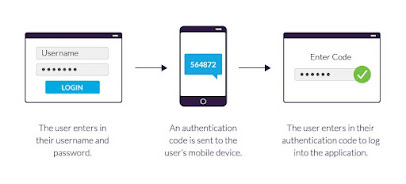
If a service supports it, you should be using two factor authentication (2FA). This adds a periodic passcode to WhatsApp, and also ensures your data isn't accessed by someone else.

To activate 2FA, go to Menu > Settings > Account > Two-step verification > Enable. Follow the steps to create a six-digit PIN code that you can easily remember. Importantly, add your email address to retrieve that code in case you forget it.

4. Protect Your Privacy on WhatsApp:

WhatsApp isn't the most private messenger out there, but it gives users at least some control. Go to Settings > Account > Privacy to see everything at your disposal.

You can control who can see your Last Seen, profile photo, about, status, and live location. You can also turn off Read Receipts here, so the blue check marks are switched off.

5. Disable Cloud Backups (If You Care About Privacy):

The end-to-end encryption is awesome, but there's one loophole: whatsapp back up chats to google drive or iCloud. That way, if you reinstall it later, you can retrieve your old messages. But this backup isn't encrypted.

So if you really care about your privacy, then that's something you need to disable. Remember, storing your data with Apple and Google might not protect you against eavesdropping by governments.

To disable automatic cloud backups:

  • On iPhone: Go to WhatsApp > Settings > Chats > Chat Backup > Auto Backup > Off
On Android: Go to WhatsApp > Menu > Settings > Chats > Chat Backup > Backup to Google Drive > Never

Sunday, October 31, 2021

HOW TO MAKE YOUR SOCIAL MEDIA ACCOUNT MORE SECURE

 1. CHOOSE A STRONG PASSWORD

• Strong Password contains Symbols. Numbers, and Letters mixed in Upper and Lower Case


• But Many People still Uses "iloveyoupooja" types of password, these types of password are so much easier to h4ck


2. CHANGE PASSWORD FREQUENTLY

• Password is like a ToothBrush you have to change it after few weeks or after a month


• And yes, always remember that whenever you change the password choose the option "logout from other devices".


3. ALWAYS USE 2-FACTOR AUTHENTICATION

Always use 2-FA, but what is 2-FA? it is an extra layer of protection used to ensure the security of online accounts beyond just a username and password.


• And Do it before it is too late, because many people thinks that this is waste of time


4. BEWARE OF THIRD PARTY APPS

• Many third-party apps try to get email id and password for signup or for logging in, but some apps try to steal and save your data and password


• So be careful when you install any third party app, and think twice before entering you email and password there.


5. BEWARE OF PHISHING LINKS

• See many people who own a business account gives their email id in bio, and using that email any h4cker can attack you through phishing attack


 And there are so many sites that phishing sites be careful before you open any link

Thursday, October 28, 2021

Best chrome extension and apps for students


Best chrome extension and apps for students:

1. Grammarly

Grammarly keeps a check on your spelling and grammar when you’re writing online and ensures that you never make a typo or end up looking dumb because of misplacing an apostrophe. It works almost anywhere you may be writing online—including but not limited to Gmail, Facebook, Twitter, LinkedIn, and Tumblr.


2. Crystal for Gmail

Crystal helps you tailor your emails based on the personality of the person you’re writing to. Crystal makes profiles of people based on public data (tweets, blog posts, forum posts) available on them and then uses this information to help you understand what kind of communication they would respond best to—it actually works a bit like magic.

3. Pocket

Pocket won the Webby award for best productivity app of 2014 and has a user base of 15 million people. It’s a simple tool that helps you to save articles, videos and more for later consumption.

With Pocket, all of your content goes to one place, so you can view it anytime, on any device.


4.Buffer

Buffer is the easiest, smartest and most frictionless way to share content on social media. Whenever you come across something interesting that you want to share on your social networks, all you need to do is click on the Buffer button and a box will show up which will let you choose multiple networks (Twitter, Facebook, LinkedIn, Google+) and either share the content instantly with one click or schedule it to be shared at a later time. It’s so easy to use; you’ll wonder how you ever managed without it.


5. Clearly

Clearly takes the clutter out of reading online and makes it a pleasure again. With one click, Clearly removes all unnecessary page elements such as sidebars, ads, and social buttons from blogs, articles, and web pages—allowing you to focus on the thing that matters to you most—content. It also allows you to view multi-page articles on a single page


How to know if your phone has virus and how to remove it??

 How to know if your phone has virus and how to remove it?? These 8 signs are an indication that your phone may have a virus: Excessive da...